For engineering offices

Stop touching the same title block 300 times a project.

DrawingOps automates the boring, error-prone, deadline-eating parts of CAD title-block management. Bulk update, drawing register, change tracking, standards enforcement, and incoming-drawings intake — five tools, one app.
30-day free trial · Windows / macOS / Linux · One-time license, free v1.x updates

DrawingOps v1.8
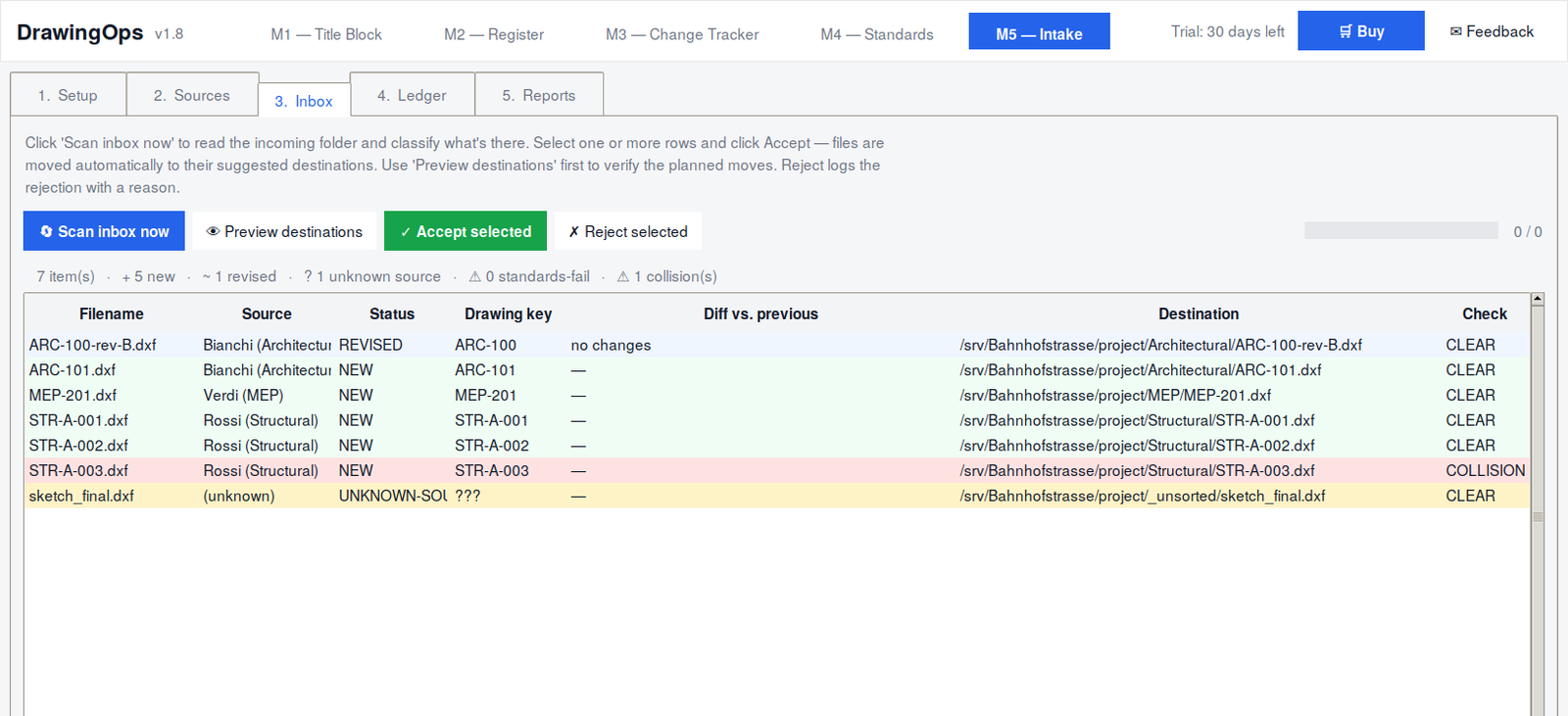
DrawingOps Module 5 — Inbox view showing 7 incoming drawings color-coded by status: REVISED, NEW, COLLISION, UNKNOWN-SOURCE
The problem

Title blocks are a tax on every project

If you run an engineering office, you know the drill. The drawings change. The revision date gets stamped wrong on three sheets. The architect sends a new floor plan but no one updates the master register. The structural sub-consultant ships drawings with their own title block instead of yours. Tomorrow there's an audit, and someone has to compile a register of every drawing currently in the project — by hand.

Each individual task is small. Five minutes here, ten minutes there. But across a project, across a year, across a team of five engineers, it adds up to hundreds of hours. Hours that nobody bills for, nobody enjoys, and nobody catches when something slips through.

DrawingOps replaces that. Five focused modules, one keyboard shortcut, no more spreadsheet gymnastics.

What's inside

Five modules, one app

Each module solves one specific problem. They share the same project settings, the same attribute mappings, and the same audit-grade output formats.

📋

M1 — Title Block Updater

Bulk-update title block attributes from an Excel spreadsheet. Map your columns once, write to 200 drawings in seconds. Dry-run mode confirms what will change before anything is touched.

📊

M2 — Drawing Register

Walk a folder, extract every title-block field from every drawing, generate a complete drawing register. Outputs Excel + CSV + audit-quality PDF in one click.

🔄

M3 — Change Tracker

Compare two snapshots of the project (Rev. A vs Rev. B). Get a structured diff with severity classification (TRIVIAL / MINOR / MAJOR / CRITICAL) and an auto-populated revision history table.

M4 — Standards Enforcer

Define your firm's title-block standard once. Lint every drawing against it — required blocks, allowed values, regex patterns, consistency rules. Outputs an ISO 9001-grade compliance certificate.

📥

M5 — Incoming Tracker

Manage drawings arriving from sub-consultants. Define sources, scan an inbox, get color-coded triage (NEW / REVISED / COLLISION / STANDARDS-FAIL). Auto-move on accept with collision check. Persistent custody log.

📦

One application

Five modules, one window, one keyboard shortcut. Shared presets and standards across modules. Works with .dxf out of the box; .dwg with ODA File Converter or AutoCAD installed.

The differentiator

Audit-grade evidence, automatic

The thing nobody else does well: a tamper-evident chain-of-custody log for every drawing in the project.

When ISO 9001 auditors ask "what version of the architect's plans was used when the structural calcs were done in March?", most offices answer by digging through email archives. DrawingOps answers in three seconds.

Every drawing that arrives gets logged. Timestamp, source, SHA-256 hash, who accepted it, what its title block said. Every revision, every rejection, every replacement — written to an append-only ledger that lives inside your project folder. Export to PDF for the audit binder, or filter by date range for a weekly status meeting.

Built for ISO 9001: the PDF custody log includes timestamps, file hashes, project metadata, and a limitation disclaimer — exactly what auditors and dispute investigators ask for.
Who it's for

Built for the people doing the work

👷

BIM coordinators

You're the person who keeps the drawing register in shape. DrawingOps is the tool you've been faking with macros and Excel formulas — but actually built for the job.

🏢

Small engineering offices

5–50 person firms shipping civil, structural, MEP, or architectural projects. Where the document controller role is shared among the team because nobody can justify a full-time hire.

🎯

Project managers

You don't want to use it daily — but you want the audit-grade reports it produces, and you want your team to stop burning hours on title-block fixes the night before delivery.

Pricing

Simple, no subscription

One license, one price. Free updates within v1.x. No surprise renewals.

Trial
CHF0
30 days, full features
  • All five modules unlocked
  • Unlimited drawings
  • Excel + PDF reports
  • Read-only mode after expiry
  • Email support
Download trial

Need multiple seats or an office license? Get in touch — we'll work something out.

FAQ

Common questions

DrawingOps reads and writes .dxf files natively — those are the universal CAD interchange format and work with AutoCAD, BricsCAD, ZWCAD, LibreCAD, NanoCAD, and any other CAD package. For .dwg files, you'll need either ODA File Converter (free) or AutoCAD installed on the same machine. DrawingOps detects either automatically.
No. Module 1 has a mandatory dry-run mode that shows you exactly what would change before anything is touched. Backup files are created automatically before every real run. Module 5's auto-move refuses to overwrite untracked files (collision detection). Every action is logged.
Module 4's compliance certificate explicitly states that it covers title-block compliance only — geometry, line weights, layer standards, and dimension content are not verified. We don't try to be a full CAD-standards auditor. We do the title-block job extremely well, and we're honest about the scope.
Download and install. The first run records today's date. For 30 days, all five modules work fully. After 30 days, the app stays installed and continues to work in read-only mode — you can still browse drawings and view your custody log, but write actions (M1 real run, M4 lint, M5 accept/reject) are blocked until you buy a license.
Your license covers all v1.x updates. If we ever ship v2.x with major new functionality, that will be a separate purchase — but we'll offer existing customers a meaningful upgrade discount. v1.x will receive bug fixes and minor features for at least 24 months from your purchase date.
Yes. 30-day money-back guarantee, no questions asked. If DrawingOps doesn't fit your workflow, email jacopo@anvilship.eu within 30 days of purchase and we'll refund you. The 30-day trial exists so you can verify fit before paying — but the guarantee is there for the edge cases.
DrawingOps is a desktop application that runs entirely on your machine. It doesn't upload your drawings, doesn't track your usage, doesn't phone home. The only network traffic is when you click the in-app Buy or Feedback buttons — those open your browser. Your drawings and custody log stay on your local disk.
Email jacopo@anvilship.eu directly — there's no support ticket queue or chatbot. Most replies arrive within one business day. There's also a Feedback button in the app header that opens a pre-filled email for bug reports and feature requests.

Try it free for 30 days

No credit card. No phone-home. Just download, install, and see if it cuts your title-block hours in half.

Get DrawingOps — CHF 249 →